🔍 Everything You Need to Know About Attack Shark Software: Features, Setup, and Benefits
Introduction
Attack Shark is known for creating affordable and high-performance gaming peripherals, but what powers their devices behind the scenes is the Attack Shark software—a unified utility that lets you customize, optimize, and upgrade your gaming experience. In this guide, we’ll cover everything you need to know about Attack Shark Software.
In this blog we will discus how to install attack shark software .
🎮 What Is Attack Shark Software?
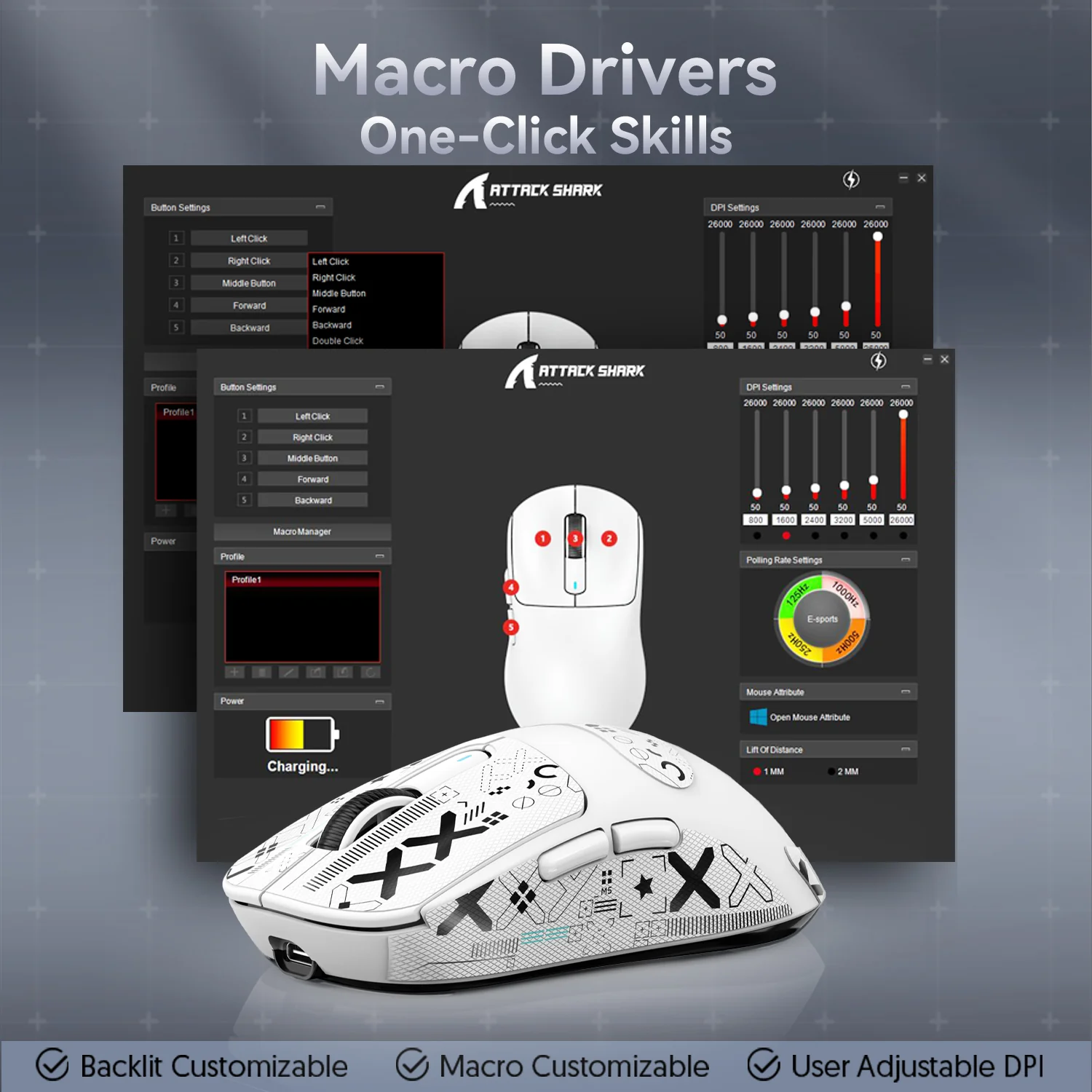
Attack Shark Software is a driver and customization utility developed for Attack Shark gaming gear such as mechanical keyboards, gaming mice, and RGB accessories. It enables users to:
- Reprogram keys or mouse buttons
- Create macros
- Customize RGB lighting
- Adjust DPI and sensitivity
- Save gaming profiles
🛠️ Designed for gamers and productivity users alike, this software enhances control, speed, and personalization.
🔧 How to Download & Install Attack Shark Software
- Go to the Official Attack Shark Website here
Visit the manufacturer’s official page or check the product manual for a verified download link. - Choose the Correct Product Model
Select your device (e.g., X11 mouse, K75 keyboard) to get the right version. - Download and Install
Download the.exefile, run the installer, and follow the setup instructions. - Restart and Connect Your Device
After installation, plug in your Attack Shark device. The software should auto-detect it.

⚙️ Key Features of Attack Shark Software
| Feature | Description |
|---|---|
| 🔄 Macro Recording | Record and assign complex multi-key commands. |
| 🌈 RGB Lighting Control | Change colors, effects, and sync lights with other gear. |
| 🎯 DPI Adjustments | Fine-tune mouse sensitivity from 200–16000 DPI. |
| 🧠 Onboard Profiles | Save different settings for games or work. |
| 🖱️ Button Mapping | Remap keys/buttons to match your playstyle. |
💡 Tips for Optimizing with Attack Shark Software
- Create separate profiles for games like Valorant, COD, or Dota 2.
- Use macros for repetitive tasks in work apps or MMOs.
- Match RGB lighting with your full PC setup for visual consistency.
- Keep the software updated regularly for bug fixes and new features.
📦 Compatibility & System Requirements
- 🖥️ OS: Windows 7, 8, 10, 11
- 🧩 Compatible Devices: Attack Shark X11, K75, X3 RGB, and more
- 🔌 USB 2.0/3.0 required
- 💾 Minimum 100MB free space
⚠️ Currently, no official support for macOS or Linux.
🧪 Performance & User Experience
Most users find the software:
- Lightweight and non-intrusive
- Easy to use with a clean UI
- Reliable for storing custom settings
- Rarely causing crashes or conflicts
⭐ Overall, the software scores well in usability and gaming performance customization.
❓FAQs
Q1: Is Attack Shark Software safe to install?
✅ Yes. Always download from the official site to avoid malware.
Q2: Can I use the software with non-Attack Shark devices?
❌ No. It only supports Attack Shark hardware.
Q3: How to reset all settings?
Go to Settings > Factory Reset > Confirm.
🔗 Internal Links
Top Attack Shark Gaming Products
Upgrade your gaming setup with premium Attack Shark peripherals. From ultra-lightweight gaming mice to high-performance mechanical keyboards, these products are designed for speed, precision, and reliability.
ATTACK SHARK X11 Wireless Gaming Mouse – PAW3311 Sensor, Tri-Mode Connectivity
Experience smooth and accurate tracking with the Attack Shark X11. Featuring a PAW3311 sensor, lightweight ergonomic design, and tri-mode connectivity (2.4GHz, Bluetooth, and USB-C), it’s an excellent choice for competitive gamers and everyday users.
Attack Shark X3 PRO 8K Wireless Gaming Mouse
The X3 PRO delivers elite gaming performance with the PixArt PAW3395 sensor, up to 26,000 DPI, ultra-fast 8K polling rate, and tri-mode connectivity. Its lightweight build makes it perfect for fast-paced FPS and esports gaming.
Attack Shark R1 Wireless Gaming Mouse – Tri-Mode
Designed for comfort and precision, the Attack Shark R1 features a PAW3311 sensor with up to 18,000 DPI, tri-mode wireless connectivity, and a lightweight 59g body for effortless movement during long gaming sessions.
Attack Shark X820 Ultra RGB Tri-Mode Mechanical Gaming Keyboard
Enjoy responsive mechanical switches, vibrant RGB lighting, hot-swappable keys, a built-in TFT display, and flexible wired or wireless connectivity in this compact 75% gaming keyboard.
ATTACK SHARK R68 HE Carbon Fiber Magnetic Gaming Keyboard
Built with Hall Effect magnetic switches and Rapid Trigger technology, the R68 HE offers lightning-fast response, premium carbon fiber styling, customizable RGB lighting, and an impressive 8K polling rate for professional-level gaming.
🌐 External Resources
📢 Final Thoughts
Attack Shark Software gives you deep control over your gaming gear, especially if you own a Shark X11 mouse or K75 keyboard. With features like macro creation, lighting control, and sensitivity adjustments, it’s an essential tool for gamers and creators alike.